Why Forms Matter More Than Most Websites Realize
Web forms are often treated as an afterthought—a necessary functional element buried somewhere on a contact page. In reality, forms are the lifeline connecting your website to your business objectives. Whether you're building a SaaS platform, running a creative agency, or managing an ecommerce store, forms serve three critical functions that directly impact revenue and growth.
First, forms capture leads. Every qualified prospect who fills out your form is a potential customer. Without an effective form system, you're leaving money on the table. Second, forms collect customer feedback and data. Understanding what your audience wants, needs, and struggles with is invaluable for product development and marketing decisions. Third, forms enable automation. When connected to the right tools, a form submission can trigger an entire workflow—sending confirmation emails, creating database entries, updating CRM records, and notifying your team instantly.
The quality of your form infrastructure directly impacts your conversion rates and operational efficiency. A poorly designed form with integration gaps might lose you customers before they even submit. A well-integrated form system with clear validation and instant backend processing creates a seamless experience that builds trust and accelerates business growth.
Framer's Built-In Form Capabilities Overview
Framer has evolved into a powerful platform for building web applications, and its form system reflects this maturity. Unlike basic website builders that treat forms as a checkbox feature, Framer provides developers and designers with flexible, production-ready form components that can be customized extensively.
Out of the box, Framer's form system includes native form components with built-in styling, layout controls, and interactivity. You can create custom form experiences without writing backend code. The form components are fully responsive, accessible by default, and integrate seamlessly with Framer's design system.
What makes Framer forms particularly powerful is the flexibility under the hood. You're not locked into a single submission mechanism. Instead, Framer forms support multiple submission options—email, Google Sheets, webhooks, and custom backend endpoints. This flexibility means your form infrastructure can scale as your business grows.
Additionally, Framer allows you to add validation logic directly in the design tool or through code. You can create conditional form flows where questions appear or disappear based on user input, creating intelligent, contextual experiences that improve completion rates and data quality.
Form Submission Options: Email, Google Sheets, and Webhooks
When you create a form in Framer, you need to choose where that data goes. The platform supports several submission methods, each with different use cases and complexity levels.
Email Submission
The simplest form submission method is email. When a user submits a form, the data is sent directly to your email address. This approach requires no backend setup and works instantly. It's ideal for small contact forms where you don't need to store or analyze submission data.
However, email-based submissions have limitations. Email inboxes aren't designed for data management. If you receive dozens or hundreds of form submissions, they quickly become impossible to manage. There's no search, filtering, or easy way to export data. Email also isn't reliable for automation—triggering downstream workflows requires additional setup.
Google Sheets Integration
Google Sheets integration is more powerful. When a form is submitted, the data automatically appends a new row to a Google Sheet. This approach solves the data management problem. You get a spreadsheet that's searchable, sortable, and analyzable. You can add formulas, create pivot tables, and share access with your team.
Google Sheets integration is particularly valuable if you're already using Google Workspace. It integrates with your existing tools—you can use Data Studio to visualize submissions, set up conditional alerts, or trigger Google Apps Script automations. For small businesses and teams, this is often sufficient.
Webhook Submissions
Webhooks represent a major leap in functionality. Instead of sending data to email or Google Sheets, your form sends data to an HTTP endpoint—an API endpoint you control. This enables unlimited possibilities.
With webhooks, you can connect your form to virtually any web service or backend system. The data reaches your infrastructure instantly, allowing you to store it in a database, validate it against business rules, trigger automated workflows, send confirmation emails, and integrate with third-party services—all in real time.
Setting Up Webhook Connections: A Step-by-Step Guide
Webhooks are the most flexible option for serious applications. Let's walk through how to set up a Framer webhook integration.
Understanding the Webhook Flow
When a form is submitted, Framer sends an HTTP POST request to your webhook URL. This request contains the form data as JSON. Your backend receives this request, processes it, and optionally sends back a response. The entire flow happens in milliseconds.
Step 1: Create or Identify Your Webhook Endpoint
You need a URL that can receive HTTP requests. This might be a cloud function (AWS Lambda, Google Cloud Functions, Firebase), a backend service (Node.js, Python, PHP), or a third-party service with a webhook endpoint. If you're using a backend-as-a-service platform, identify the specific endpoint URL.
Step 2: Configure the Form in Framer
In Framer's form component settings, locate the "Submission" or "On Submit" section. Select "Webhook" or "Custom Endpoint" as the submission method. Enter your webhook URL. This is the endpoint that will receive the form data.
Step 3: Test the Connection
Before publishing your site live, test the webhook connection. Submit a test form and verify that your backend receives the data. Check that all form fields are being transmitted correctly and that your backend can parse the JSON payload.
Step 4: Add Error Handling
Configure what happens if the webhook fails. You might show an error message to the user, suggest they try again, or provide an alternative submission method. Good error handling ensures users aren't left confused if something goes wrong.
Step 5: Monitor and Debug
Once live, monitor your webhook logs. Services like Zapier, Make, or your cloud provider's logs will show you all incoming requests. If submissions aren't being processed correctly, you can see exactly what data was sent and why it failed.
Backend Solutions: FormBackend, BuildShip, Formspree, and MagicForm
If you don't want to build a custom backend but need more power than email or Google Sheets, several dedicated Framer form backend solutions exist.
Formspree
Formspree is a form backend service designed specifically for static sites and site builders. You simply create a form, point it to your Formspree endpoint, and it handles everything—data storage, email notifications, spam filtering. Formspree stores your submissions in a clean dashboard, exports to CSV, and integrates with Zapier for automation. It's ideal if you want a middle ground between Google Sheets and a custom backend.
FormBackend
FormBackend specializes in Framer integrations. It accepts form submissions via webhooks and stores them in an online database. You access submissions through a dashboard, set up email notifications, export data, and configure integrations with Zapier and Make. FormBackend handles the complexity of running backend infrastructure while keeping the experience simple.
BuildShip
BuildShip takes a different approach. Instead of a simple form backend, it's a visual backend builder. You define workflows in a visual editor—receive form data, validate it, save to a database, send emails, call APIs, anything you want. BuildShip connects directly to Framer and can be configured without writing code. For developers comfortable with workflow automation, this is powerful.
MagicForm
MagicForm is another lightweight backend service focused on Framer. It receives form submissions, stores them, and provides a simple API for retrieving data. It integrates with Zapier and includes spam protection. MagicForm is straightforward and affordable for small to medium projects.
Automation Workflows: Connecting Forms to Zapier, Make, Email, and CRM
Form automation is where business value really emerges. When a form is submitted, you can trigger a chain of actions that would otherwise require manual work.
Zapier Integration
Framer Zapier integration is simple and powerful. Zapier connects to thousands of applications. You create a "Zap" that triggers when a form is submitted. The trigger passes the form data to an action—sending an email, creating a contact in your CRM, adding a row to a spreadsheet, posting to Slack, creating a task in a project management tool, or anything else Zapier supports.
The beauty of Zapier is that you don't need to code. You configure workflows visually. A typical setup might be: form submission triggers → send thank-you email to user → save data to CRM → notify sales team in Slack → create follow-up task in project management tool. All of this happens automatically within seconds.
Make (formerly Integromat)
Make is Zapier's main competitor and is often preferred by developers. It has a more visual interface, more powerful workflow capabilities, and is generally more affordable for high-volume automation. Make connects to Framer via webhooks and can handle complex conditional logic, data transformation, and multi-step workflows.
Direct Email Automation
You can configure Framer to send automated emails directly upon form submission—either as a confirmation to the user or as a notification to your team. Services like SendGrid, Mailgun, or AWS SES can handle email delivery at scale. This is faster than waiting for Zapier to process the trigger.
CRM Integration
For sales-driven organizations, connecting forms directly to your CRM is essential. Forms can automatically create contacts or leads in HubSpot, Salesforce, Pipedrive, or any other CRM. When someone submits a form, they immediately appear in your sales pipeline, reducing manual data entry and ensuring no leads are missed.
Form Validation, Spam Protection, and UX Best Practices
A powerful form is worthless if it's filling your database with garbage data or frustrating users with poor validation.
Client-Side Validation
Validate form fields before submission. Check that email addresses are formatted correctly, required fields are filled, phone numbers are valid numbers, and URLs are properly formatted. Client-side validation provides instant feedback, improving the user experience and reducing server load.
Server-Side Validation
Never rely solely on client-side validation. Always validate on your backend. A user might disable JavaScript, modify the request, or send invalid data intentionally. Server-side validation ensures data integrity regardless of how the request arrives.
SPAM and Bot Protection
Without protection, your form will be hammered by spam bots. Implement CAPTCHA (Google reCAPTCHA is standard), honeypot fields, rate limiting, or IP-based blocking. Check submissions against known spam patterns. If you're using a service like Formspree or FormBackend, these protections are often built in.
Progressive Enhancement
Don't require JavaScript for basic form submission. HTML forms work without JavaScript. If you add interactive features like auto-saving drafts, live validation, or dynamic field visibility, do so as enhancements on top of a functional baseline.
Mobile Optimization
Test your forms on mobile devices. Touch targets should be large enough to tap easily. Labels should be visible and clearly associated with inputs. Multi-step forms might be easier on mobile than a single long form. File uploads should work reliably.
Accessibility
Ensure forms are usable by people with disabilities. All form fields need associated labels. Use semantic HTML. Ensure sufficient color contrast. Test with a screen reader. Proper form structure benefits both accessibility and SEO.
Tracking Form Analytics and Conversion Funnels
Collect data on how your forms perform. What's your submission rate? How many users start filling out a form but abandon it? At which field do most abandoners drop off? This data guides optimization.
Event Tracking in Analytics
Set up event tracking in Google Analytics or similar tools. When a form is submitted, send an event. When a specific field is focused or filled, send an event. Over time, you'll see patterns in user behavior. You'll identify which fields cause confusion or abandonment.
Conversion Rate Optimization
Use your form analytics to improve performance. If abandonment spikes at a specific field, make that field optional or provide more context. If most users complete the form but don't convert afterward, the problem might not be the form itself—it might be what happens next. Read our guide on conversion rate optimization for deeper strategies.
Funnel Analysis
If you have multiple steps in your form or a conversion funnel that extends beyond the form (visit page → fill form → confirm → upgrade), track how many users make it through each stage. This reveals where you're losing prospects.
Advanced Integrations: HubSpot, Slack, Discord, and Airtable
Beyond basic backends and automation platforms, modern Framer forms can integrate with sophisticated business tools.
HubSpot Integration
HubSpot is a CRM and marketing platform used by millions of companies. Framer forms can send data directly to HubSpot, creating contacts, leads, or deals automatically. You can assign leads to team members, trigger email sequences, or log activities—all based on form submission. This integration is particularly valuable for B2B companies that rely on HubSpot for sales and marketing processes.
Slack Integration
Send form submissions directly to Slack. When a form is completed, a message appears in your team's Slack channel with the submission details. Your team sees leads in real time and can respond immediately. This is especially powerful for inbound sales inquiries or customer support tickets.
Discord Integration
Similar to Slack, you can send form submissions to a Discord server. This is particularly useful for communities, gaming projects, or organizations already using Discord for team communication. Discord webhooks make this integration simple.
Airtable Integration
Airtable is a flexible database platform. Framer forms can write directly to Airtable bases. Once data is in Airtable, you can use powerful automations, sync to other tools, or generate reports. Airtable's relational database features give you far more flexibility than Google Sheets for complex projects.
Custom Database Integrations
If you're building a serious web application, you might store form data in your own database—PostgreSQL, MongoDB, Firebase Realtime Database, or another solution. Framer sends webhook data to your backend, which validates it and stores it in your database. This gives you complete control and the ability to build sophisticated features on top of your data.
Best Practices for Form Performance and Security
High-performing, secure forms are critical for user trust and business success.
HTTPS and Encryption
All form submissions must occur over HTTPS. This encrypts data in transit, preventing interception. If you're collecting sensitive information like passwords or payment details, consider additional encryption layers for data at rest.
Data Privacy and Compliance
If you're collecting personal information from users in the European Union, you must comply with GDPR. If you handle payment information, you need PCI compliance. Other regulations like CCPA, HIPAA, or industry-specific rules may apply. Ensure your form system and backend infrastructure meet these requirements. Privacy policies should be clear about data handling.
Rate Limiting
Prevent abuse by limiting how many submissions can come from a single IP address within a time window. This protects against both malicious actors and accidental spam.
Input Sanitization
Always sanitize and validate user input on your backend. Remove or escape special characters that might be used for injection attacks. This is particularly critical if form data will be displayed on your website or sent to other users.
Error Messages
Show helpful error messages when validation fails. Tell users exactly what's wrong and how to fix it. Avoid generic errors like "Invalid input." Be specific: "Email address must contain an @ symbol" or "Phone number must be 10 digits."
Optimizing Form Design for Conversions
The quality of your form extends beyond functionality—design and user experience matter tremendously.
Form Length and Friction
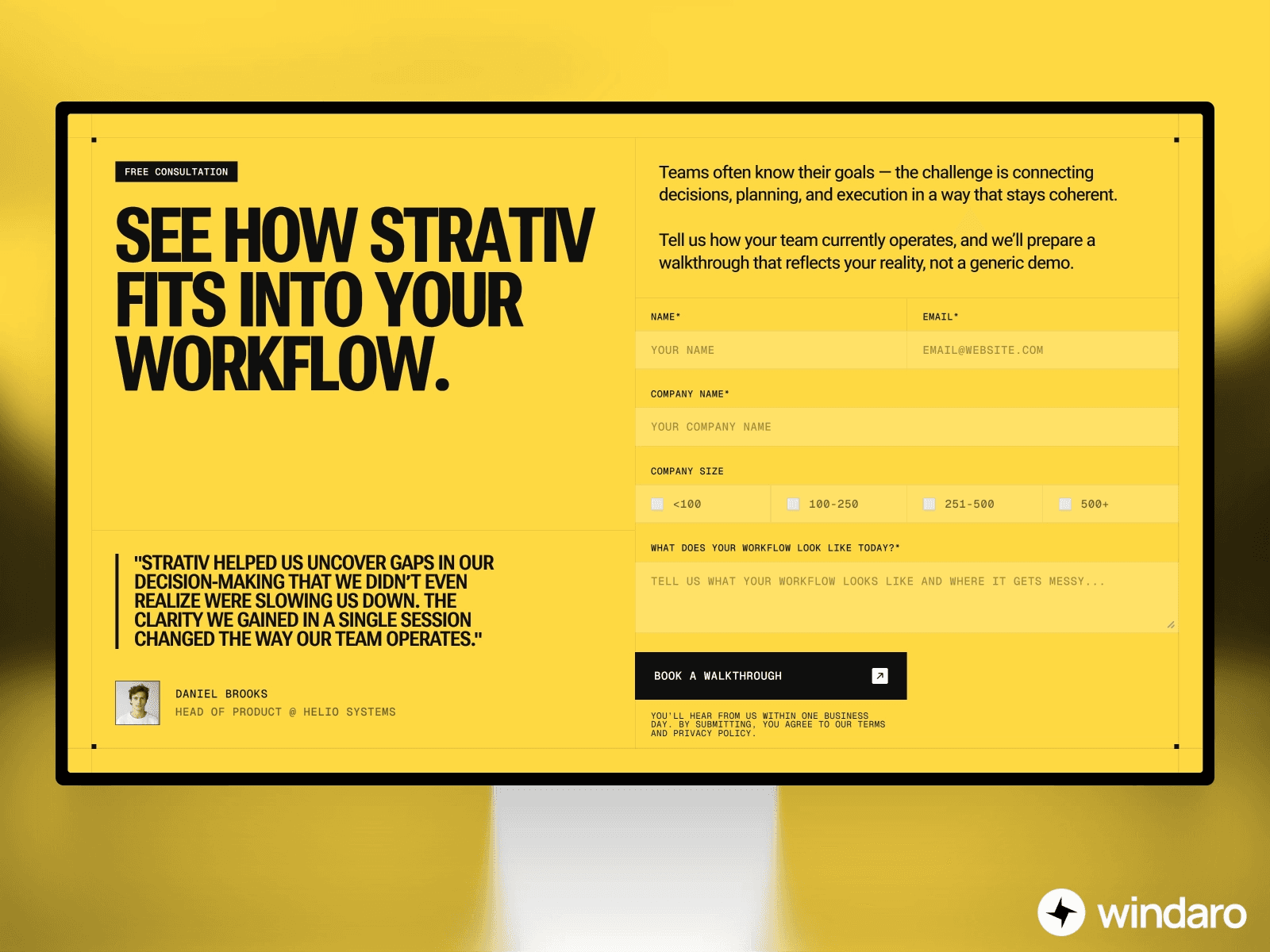
Shorter forms convert better. Every additional field you add increases abandonment. Ask only for information you actually need. Consider a two-step form where the first step collects essential information and the second step (optional or progressive) collects additional details.
Clear Labels and Placeholder Text
Form fields should be immediately understandable. Labels should be clear and positioned appropriately. Placeholder text can supplement labels but shouldn't replace them. Use descriptive text to guide users—explain why you need information if it's not obvious.
Visual Feedback
Show users that their input was successful. As they fill fields, provide instant validation feedback. When the form is submitted, show a loading state so they know something is happening. After submission, show a success message or confirmation page.
Progressive Disclosure
Don't show all form fields at once. Hide fields that are only relevant in certain contexts. Ask a qualifying question first—if the user answers "no," skip irrelevant fields. This reduces cognitive load and improves completion rates.
Integration Architecture and Scaling Considerations
As your form traffic grows, you need to ensure your integration infrastructure can handle volume.
Webhook Reliability
Webhook delivery isn't always guaranteed on the first attempt. Network issues, temporary service outages, or server errors can cause failures. Implement retry logic. Your backend should attempt to redeliver failed webhooks. Services like Zapier and Make handle this automatically.
Data Backup and Redundancy
Don't rely on a single service to store your form data. If you're using FormBackend, also back up data regularly. Consider syncing important submissions to your own database. If a service goes down or you lose access, you don't lose critical business data.
Load Testing
Before launching a major campaign or expecting high form traffic, test your infrastructure. Submit forms at scale to ensure your backend can handle the load. Check that email notifications don't overwhelm your inbox. Verify that database writes don't create bottlenecks.
Monitoring and Alerting
Set up monitoring to track form submission success rates. Alert your team if the failure rate spikes. Monitor webhook latency. If submissions are taking too long to process, investigate and optimize. Proactive monitoring prevents small issues from becoming crises.
Framer Forms in Context: SEO and User Experience
Forms are a crucial part of the larger user experience and site performance picture. Check out our Framer SEO guide for strategies that work alongside form optimization. For ecommerce sites specifically, learn about ecommerce with Framer, which includes form-based checkout and customer data collection strategies.
Site speed also impacts form performance. Users are less likely to complete slow forms. For site-wide performance optimization, ensure your form components don't create unnecessary overhead and that backend processes complete quickly.
Real-World Form Implementation Examples
Different use cases require different form approaches. A lead generation form for a B2B SaaS company might connect to HubSpot, trigger a welcome email sequence, and notify the sales team in Slack. An ecommerce customer feedback form might store responses in Airtable and trigger customer service workflows. A job application form might store submissions in a database, auto-send confirmation emails, and notify hiring managers.
The flexibility of Framer's form system makes all these scenarios possible without extensive custom development.
Conclusion
Forms are far more than input fields on a page. In 2026, Framer forms represent a complete, integrated system for capturing data, automating workflows, and driving business growth. Whether you use basic email submission, Google Sheets integration, or complex webhook-based backends with multi-tool automation, Framer provides the flexibility and power to match your needs.
The key is understanding your options and choosing the right approach for your use case. Start simple with email or Google Sheets. As your needs grow, graduate to a dedicated backend service like FormBackend or Formspree. For sophisticated applications, connect to Zapier, Make, or directly to your own infrastructure. Prioritize user experience, data security, and conversion optimization at every step.
Modern form technology shouldn't be complex or limiting. Framer proves that you can have powerful form infrastructure that's also simple to set up and manage. By implementing the strategies in this guide, you'll create forms that capture leads, delight users, and integrate seamlessly with your entire business ecosystem.